
patrick • September 30, 2024

Verkada’s Tailgate Detection Solution Reviewed
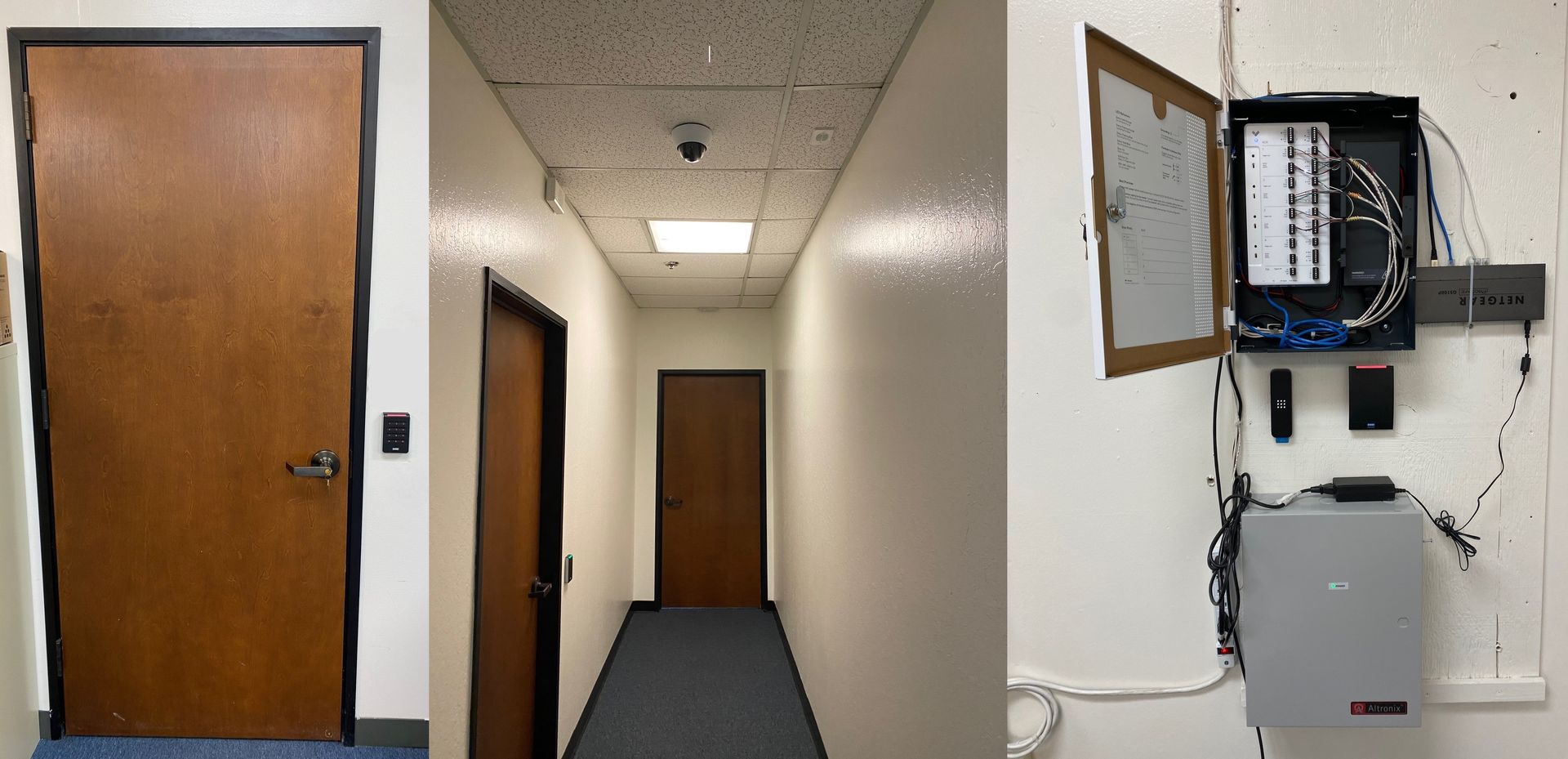
Does Verkada’s Access Control Tailgate Detection solution work you?


Tailgating: is when an unauthorized individual follows an authorized person through an access controlled door; gaining entry into the space without presenting a valid credential. It is a common risk for all access control systems. 

Verkada offers a native solution utilizing their cameras and access control system.  Through their software analytics they can detect and alert personnel of this violation.


Setup


The recommended configuration is an access controlled door equipped with a reader, door contact, request to exit device, and locking hardware. Configure this door to work normally on the Verkada system. Have one interior camera viewing the door. This door / reader will be paired with the interior camera to track for tailgating. 


The analytics of the Verkada Command software allows for the monitoring of tailgating events through an access controlled door utilizing the Verkada camera and access control system.


Results


The Tailgate Detection works as long as only one valid credential is presented per door opening, which is the scenario laid out by Verkada.  If an authorized user opens the door, walks through the door, and closes the door then no violation was noted.  However, if an unauthorized person tailgated an authorized user then a violation occurred. 


If two authorized users passed through the door on one opening, both presenting a valid credential to the reader, then a tailgating event occurred. No violation occurred upon exiting, one or multiple people, as expected.


We noted that the time from which the violation occurred to which the event notification was received at the Command software varied from 2-5 minutes. This notification is not instantaneous. 


 Possible Issues


If two or more authorized people approach the door together then each person will need to enter separately, otherwise they will trigger a tailgating event. One door opening and two or more valid credentials triggered the tailgating event. 


As we demonstrated this to our end user it was sticking point for their purposes. It was viewed as not being practical, especially at their lobby entry doors where multiple authorized people routinely enter and exit together. The other sticking point was how do you handle visitors? The initial thinking was the authorized person could present their credential multiple times for the number of people passing through. This will not work as only one valid credential is allowed per opening, so each guest would need a credential and would need to enter independently.


Conclusion


It is important to understand how the Tailgating Detection works and really think about the application. If you have a heavily trafficked door this probably won’t work well for you. If you have a door with lots of guests this won’t work for you. The application seems best for a low traffic doors without guests such as a lab, data center, IT room, etc. and not ideal for your front lobby doors.
By Ian Torpey April 1, 2026
Learn how the Brivo access control system uses cloud management, scalable controllers, and mobile credentials to secure modern facilities.
By Ian Torpey March 24, 2026
Discover how remote video monitoring services from Eagle Eye provide proactive security using AI, real-time monitoring, and trusted partners to protect your business.
By Ian Torpey February 3, 2026
Brivo has recently announced they are no longer supporting several of their legacy control panels. These panels will need to be replaced before February 28, 2026. Affected Legacy Panels The following Panels have reached the End-of-Life and requires replacement Brivo ACS5000 Brivo IPDC Brivo Edge (HID-Edge) Replacement Options Brivo ACS6100 Replacement for the Brivo5000 legacy panel Brivo ACS300 Replacement for both Brivo EDGE and Brivo IPDC legacy panels Issues If Not Replaced Brivo's legacy hardware does not support many of Brivo's current and planned features. Also, the legacy hardware exposes companies to potential security risks and supportability issues as the legacy panels cannot comply with modern security standards. We are Here to Help When upgrading your legacy hardware with PPSS, we will take every step to ensure that there are minimal disruption to your operations. Our experienced technicians will coordinate a seamless transition with low downtime, maintaining the security integrity of your property throughout the upgrade process. For more information or to schedule your system upgrade, please contact our office today.
By patrick July 16, 2021
Openpath is a secure cloud based access control system offering some very impressive and unique features not found in other access control systems. The Openpath access control system primarily utilizes mobile credentials allowing users to use their phones for access into the building. Openpath Readers Allow for Hands Free Entry One of their unique features is the hands free entry. The Openpath readers can be configured to allow the wave of your hand to unlock the door. Allowing you to keep your phone in your pocket, backpack, or purse and not having to present it to the reader. The Openpath readers work with the mobile credentials as well as the Openpath cards and tags. They will even work with legacy HID Proximity credentials that many companies still utilize. Video Reader Pro Openpath has just introduce the Video Reader Pro. This reader contains both the Openpath reader technology and a 5MP super high definition camera in one compact unit. It is designed to automatically associate the video clip with the access control event, allowing you the ability to see the activity at your door. Triple Unlock Technology Openpath’s patented triple unlock technology makes the use of the mobile credential very easy and reliable. This technology works with Bluetooth, WiFi, and LTE cellular data for fast authentication. Bluetooth is utilized directly by the reader and local Smart Hub. The WiFi allows for both local Smart Hub or cloud authentication. The cellular data is authenticated in the cloud. These three technologies combine to make for a quick verification and authorization. Allowing authorized users to pass quickly through secured entry points. Guest Pass If authorized your mobile users can provide Guest Passes for visitors allowing them entry into the building. These passes are provided via text or email and allow visitors entry at a specific reader or group of readers and are valid for a user specified time. Integrations Openpath has a number of integrations with various third party software and services allowing you to link your access control system to these other systems. The integrations include identity providers: Google G Suite, Microsoft Azure Active Directory, Okta, and OneLogin. They also integrate with a number of video systems: Camio, Rhombus, Milestone, and Cisco Meraki. The Openpath system will integrate with the Envoy visitor management system, as well as other integrations with Slack (business communications), Allegion (wireless locks), Zapier (business automation), Cove (tenant experience), and ButterflyMX (intercom system).
Verkada Cloud Based Video Surveillance System
By patrick March 9, 2021
Verkada Video Surveillance System is a commercial grade enterprise cloud based video surveillance system. The Verkada video surveillance solution is an advance featured cloud based system that is powerful, easy to use, and easy to share. It requires no onsite video recording equipment.
By patrick October 22, 2018
You are responsible for overseeing your company’s alarm system. Among your many other duties…. As your company has grown the way the alarm system functions has not changed to meet the changing dynamics of your organization. You are finding more times than not the alarm system is not being activated at night and on the weekends when it should be. When it is armed employees are triggering it accidently because they forgot their alarm codes or they are a new hire that has not been assigned a code. This is very typical of a growing organization. The alarm system that worked when you had 30 employees no longer works for 100+ employees. The panel does not allow for enough alarm codes, the way the system functions no longer meets your needs, you have personnel working all hours of the day and night trying to get the latest projects out and meet the deadlines of a growing successful company. As the company has grown so have your security requirements. As a 30 person company you only needed a burglar alarm system; now as a 100+ company you have the burglar system as well as the card entry system and the video surveillance system. You have all these systems because management required them, your customers required them, your insurance company wanted them, and they are providing for a better controlled and more secured environment for your employees and the critical assets of the company. So how do you make sure the burglar alarm system is being activated? That is a good question and one that has different answers depending on your circumstances. Arm & Disarm on a Schedule In some instances simply programming the alarm panel to arm and disarm based on a schedule works well. If you maintain set hours of operations then this can resolve the issue of the alarm system not being activated at night or on the weekends. This may require a panel upgrade to allow for the scheduling functions. Supervised Closings & Smart Application Likewise you may want to have the alarm system supervised. By supervising the alarm system from the monitoring station if the alarm system has not been activated by a specified time then you will receive a phone call or text message alerting you that the alarm system did not arm. The appropriate action can be taken to activate the system. If equipped with a smart application it may be as simple as activating the alarm system from your smart phone. Integrate the Alarm and Access Control Systems Sometimes integrating the alarm system with the access control system is the best solution. Configuring the alarm system such that the first person in automatically disarms the system. The system can be programmed to arm at a specific time or the last person out can manually arm the system. You can even arm the alarm system without an alarm code utilizing the quick arm function. On the Honeywell Ademco system the quick arm function is the # key plus either the 2 key to arm away or the 3 key to arm stay. No user code required. This functionality must be enabled in the system programming. Arm / Disarm Readers Sometimes the best solution is installing an Arm Disarm reader at each of the alarm keypad locations. This reader is designed to toggle the alarm system based on a valid credential. When the system is armed and a valid credential is presented the alarm system disarms. When the system is disarmed and a valid credential is presented the system arms. This eliminates the need to issue alarm codes to all of the employees they can simply use their access control credential. Perimeter Alarm Integrated with Access Control System In other instances the detectors on the alarm system have to be changed out to best accommodate the changes in the way the organization now functions. For those organizations that may have personnel working all hours of the day and night it may be best to have a perimeter alarm system that is integrated with the access control system. A perimeter alarm system consists of door contacts, glassbreak detectors, and local door alarms at the perimeter card entry doors. With this type of system we are strictly monitoring the perimeter of the building. There are no interior detectors. By integrating the alarm with the access control system you allow authorized employees to enter through a card reader door without having to deactivate the alarm system. Likewise, those employees can exit through the card reader door without triggering the alarm system after-hours. The alarm system is programmed to arm and disarm on a schedule and is supervised so if there is a failure you are notified. We at Protection Plus Security Services are experts at protecting your small to medium sized business. We have the experience and know how to provide the right solution. Please contact us for a free security review.
By patrick July 25, 2018
Too many times when speaking to business owners or their representatives about an upcoming move I hear “We don’t need security the building has it.” This false sense of security creates huge opportunities for the bad guys. I have seen many instances of the bad guys getting into the building, lying in wait until the building locks down at night, then having their way with every office in the building all because the tenants thought the building security was enough. Don’t be the next victim! Don’t be the one that shows up for work to find out your office has been broken into and critical business data or materials are missing. At a minimum you should have a simple intrusion alarm system in place; monitor the suite entry doors and install some interior motion detectors to detect the presence of an intruder in the office. This simple system can detect and deter an intruder. Additionally, you should have a video surveillance system, this system does not need to be sophisticated, it just needs to view and record the doors into the suite and any other key areas of your business. Many times the bad guys will case out the building and businesses in advance; eliminating the businesses with alarms and video systems from their list. Having a visible camera in the reception area can be a great deterrent. Finally, you may want to consider a card entry system. Control who can enter the suite and where they can go. If the suite design allows then restrict non authorized users from getting beyond the reception area. Control access into the suite; the main reception door, interior reception door, and any hallway doors. Control access into sensitive areas; the server room, any labs, etc. Make it hard to get to your sensitive data and materials. The more layers of security the harder it is for the bad guys the more likely they will move on and select a less complicated target. We at Protection Plus Security Services are experts in business security systems. Contact us for a free security evaluation. Call 800-498-9297 or visit our website at www.protectionplussecuirty.com to schedule an appointment.
By Patrick Torpey May 7, 2018
This is a funny video of how people act with public view video surveillance systems. The video surveillance system shown was not installed by Protection Plus Security
By Patrick Torpey May 6, 2018
You just completed the drill and things did not go so well…again! You are having a hard time accounting for everyone. Things are chaotic and these drills seem to take forever to complete. There has got to be a better way of doing things…. Many companies experience this same frustration.
By Patrick Torpey April 1, 2018
Whether used to enhance an existing alarm system or as a primary video surveillance option, there are some good reasons to consider Videofied. Videofied integrates cameras, illumination and motion sensors in a single device. When it detects motion, it sends a 10-second video clip of the incident over the cell network for immediate response—and arrests! Real Time Video Means Real Results The best security and video surveillance systems employ many different methods to achieve the highest levels of security. Most systems include video surveillance cameras which records events. Videofied adds an additional layer of protection delivering an immediate transmission of a video clip to the monitoring operator, providing a view of a crime in progress. The video confirms the alarm is an actual crime in progress, and not a costly false alarm. This information is relayed to law enforcement who are dispatched on a Priority Response, able to act quickly on real-time and reliable information Indoor and Outdoor Durability Whether you need to deter theft, vandalism or break-ins, Videofied, an innovative video alarm security system, can be installed right where you need it. Here are a few of the advantages: Self-powered, no AC power needed Completely wireless All weather from temperatures ranging from -20F to 140F Operates for years on a single set of batteries The Benefits of Modern Security Videofied offers modern security with flexibility and mobile convenience. Every time one of the built-in motion sensors is tripped, it both notifies you and provides a clip of the incident, whereas a traditional alarm system can only tell you that an alarm was tripped, not who or what caused the incident. The system offers additional unique benefits, as well: It can be used to upgrade and enhance existing systems Fast and easy install Cost effective No wires for intruders to cut Military grade radio transmission for incredible range and immunity to interference Interactive app makes it easy to arm and disarm Money saving solution to reduce false alarms Wireless passive infrared motion detection cameras Learn more about how Videofied can enhance the security at your operations! Call us today! 800-498-9297